Website Relaunch Without Losing SEO
A website relaunch can cost rankings if URLs, redirects, and content migration are not planned properly. Here is what to watch.
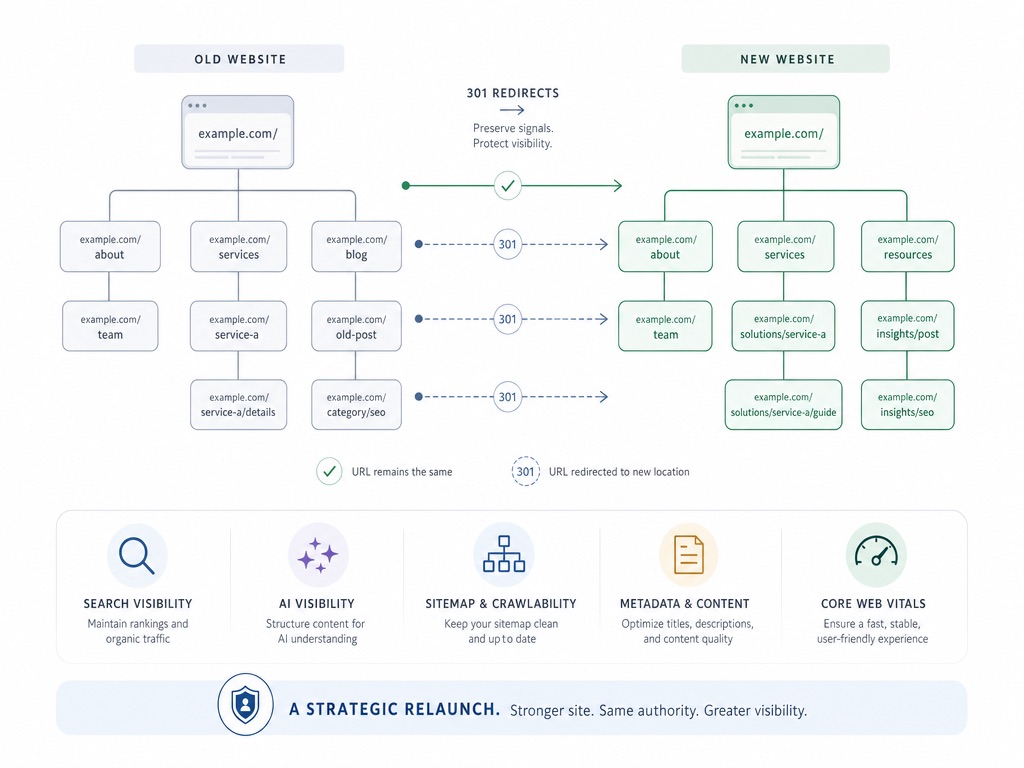
The relaunch goes live on Friday. By Monday, the traffic is gone.
That sounds dramatic, but it happens more often than it should. A website relaunch does not automatically destroy rankings. Visibility usually drops because details get missed during the move: old URLs, redirects, metadata, content, internal links, or technical signals.
In 2026, there is another layer. It is no longer only about whether Google can find your site. It is also about whether ChatGPT, Perplexity, Gemini, and Google AI Overviews can still read and use your content after the relaunch.
Why Relaunches Can Break SEO Signals
Search engines do not evaluate a website only page by page. Over time, they learn which URLs matter, which content belongs together, which pages earn links, and how the domain is technically structured.
A relaunch often changes many things at once: design, CMS, URL structure, content, templates, tracking, sometimes even the domain. That is not automatically bad. It becomes a problem when the change is no longer understandable for crawlers.
The core rule is simple: every important old signal needs a clean equivalent on the new website. If Google used to know a page at /services/web-design and after the relaunch only sees /services, that relationship needs to be technically clear. Otherwise, it looks as if the old content simply disappeared.
Every Old URL Needs a Deliberate Future
The most common relaunch mistake is weak redirect planning.
Every relevant old URL should be exported before launch. Not from memory, but properly, pulled from every source that actually knows about your pages:
- XML sitemap
- A full crawl of the live site
- Analytics
- Search Console
- Backlink data
- Old landing pages, PDFs, and images
- Special pages (campaigns, redirects already in place, legacy sections)
This is exactly where you find the forgotten URLs nobody mentioned in the project meetings.
Then each URL needs a decision:
- 301 redirect to the best matching new page if there is a useful replacement.
- 410 status if the content is intentionally removed and has no replacement.
- Keep it unchanged if the URL remains live.
What rarely helps: redirecting everything to the homepage. It feels convenient, but it does not help search engines much. An old service page should point to the new matching service page, not to a generic homepage.
Google recommends permanent server-side redirects like 301 or 308 for site moves and explicitly warns against redirect chains. So not old URL to temporary URL to new URL. Go directly to the final destination. It is faster, cleaner, and less fragile. Google explains this in its documentation on Site Moves and Migrations.
Do Not Lose Metadata and Structured Data
Relaunch conversations tend to focus on design. Understandably. The new layout is visible. A missing canonical tag is not.
But those invisible details matter. Title tags, meta descriptions, canonicals, Open Graph data, alt text, and structured data should not be added "sometime after launch." If a new CMS is introduced, these fields need to be part of the content model from the start.
Structured data is not magic, but it helps search engines understand content more clearly. Depending on the page type, Organization, Article, FAQPage, LocalBusiness, or other Schema.org types can make sense. The important part is that the data matches the visible page and is not added as decorative SEO markup.
A good CMS makes this easier. In Headless Workflow with Kirby CMS and Nuxt, I describe how metadata can be treated as normal content fields in a lean CMS, instead of being copied into a plugin field in a small pre-launch panic.
The New Website Must Not Be Slower
A relaunch is supposed to make the website better. Still, the opposite often happens: the site looks more modern, but loads more slowly.
Larger images, more animations, extra tracking scripts, external tools, heavier frontend bundles, and a new CMS can all hurt Core Web Vitals. These are Google's metrics for loading speed, responsiveness, and visual stability: LCP, INP, and CLS.
Performance is not a nice extra. A slow website feels less trustworthy, hurts conversion, and can weaken SEO signals. It also should not be measured only after launch, when everyone is mentally done with the project and nobody wants to hear the phrase "just one more performance pass."
With a custom-built website, performance can be planned early: static generation, server-side rendering, optimized images, clean components, and less unnecessary JavaScript. I explain why that is often an advantage over website builders in Webflow or Custom Code: What Really Matters.
Content Migration Is Not Copy-Paste
Content is often underestimated during a relaunch. Old copy gets exported, new pages get built, and shortly before launch someone notices that content is not the same thing as structure.
Good content migration does not mean blindly copying everything. It means deciding what stays, what gets merged, what gets updated, and what can go.
Be especially careful with pages that already rank well or bring in leads. Do not rewrite them completely just because the new design feels different. Maybe the old copy is not beautiful. Maybe it still works because it answers the right questions, matches search intent, and is well connected internally.
The new website can be clearer, better, and more modern. But it should carry over the SEO substance: relevant terms, heading structure, internal links, useful sections, images, alt text, and concrete answers.
Internal linking belongs in the migration too. If old blog posts pointed to service pages, those connections need to work after the relaunch. Otherwise, the website does not only lose individual links. It loses part of its content logic.
Multilingual Sites Need Clean Hreflang
Multilingual websites add another layer. German and English versions are not just two folders with similar pages. Search engines need to understand which page is the language or regional alternative of another page.
That is what hreflang is for. Each language version points to the matching alternatives, usually including a self-reference and, where useful, an x-default. When URLs change during a relaunch, these relationships need to be checked from scratch.
The typical mistake: the new German page still points via hreflang to the old English URL. Or one language has been migrated while the other has not. For users, that is confusing. For search engines, it looks like a half-moved house where the doorbell labels still belong to the previous tenant.
The New Layer: GEO and AI Visibility
GEO stands for Generative Engine Optimization. It is not only about whether your website ranks in Google. It is also about whether AI systems can recognize, understand, and cite your content.
This matters during a relaunch because AI crawlers need many of the same basics as classic search engines: accessible content, clean rendering, useful internal links, and no accidental blocks in robots.txt, CDN rules, or firewall settings.
Google's own guide to generative AI features in Search says that classic SEO fundamentals still form the foundation: crawlable pages, helpful content, and clear technical structure. AI visibility is not a completely separate game. But relaunch mistakes are more visible now because visibility happens in more places than the traditional results page.
Current analyses also show that Google AI Overviews can appear on roughly 15 to 25 percent of mixed search queries, depending on the study and keyword set, and much more often in information-heavy samples. Slate has a useful summary of different 2025 and 2026 datasets in its AI Overviews statistics overview. B2B benchmarks like the Opollo AI Search Benchmark also suggest that AI-referred traffic is often smaller in volume, but can convert unusually well.
For a relaunch, this means: do not turn useful content into smooth marketing copy with no structure. AI systems are more likely to cite clear answers, understandable paragraphs, concrete data, author context, and well-structured pages. If an old article used to explain something well and the new version only contains polished claims, that is not progress.
In my relaunch projects, I do not check this only by feel. I use OctoBoost, a tool I built to audit technical SEO, content, and GEO signals before and after launch. Not as a public customer dashboard, but as a background tool that helps surface problems before they cost traffic.
Monitoring Starts After Launch
The launch is not the end of the relaunch. For SEO, the most important observation phase starts afterward.
In the first days and weeks, check:
- Whether the new sitemap has been submitted
- Whether Search Console reports errors
- Whether key pages are indexable
- Whether redirects work
- Whether analytics is recording properly
- Whether rankings or clicks drop unusually hard
A short dip can be normal. Google needs to crawl and understand the new structure. It becomes a problem when important URLs return 404, canonicals point to the wrong place, the sitemap still contains old URLs, or organic traffic keeps falling.
If the domain changed, the Change of Address process in Google Search Console belongs on the list too. And very practically: tracking needs to be tested before launch. Without clean measurement, you will not know later whether you have an SEO problem or whether analytics simply stopped talking on Friday evening.
Conclusion
A website relaunch does not automatically cost rankings. It costs rankings when search engines and AI systems can no longer understand what happened to the old signals.
The important parts are not spectacular: a complete URL list, clean redirects, preserved metadata, strong performance, thoughtful content migration, correct hreflang tags, and monitoring after launch. These unspectacular things often decide whether a relaunch becomes a clean restart or a very pretty traffic accident.
If you are planning a relaunch, SEO and GEO should be considered before the final design sign-off. Many problems can be fixed after launch. They are usually cheaper, calmer, and much less annoying to avoid beforehand.
Send me a short note about what will change on your website. An early SEO and GEO check is usually much calmer than debugging visibility after launch.
mail@eugen.workThis article was drafted and translated with AI assistance.