Headless Workflow with Kirby CMS and Nuxt
Kirby CMS as a headless backend, Nuxt as the frontend: why this combination works for client projects and what the workflow looks like in practice.
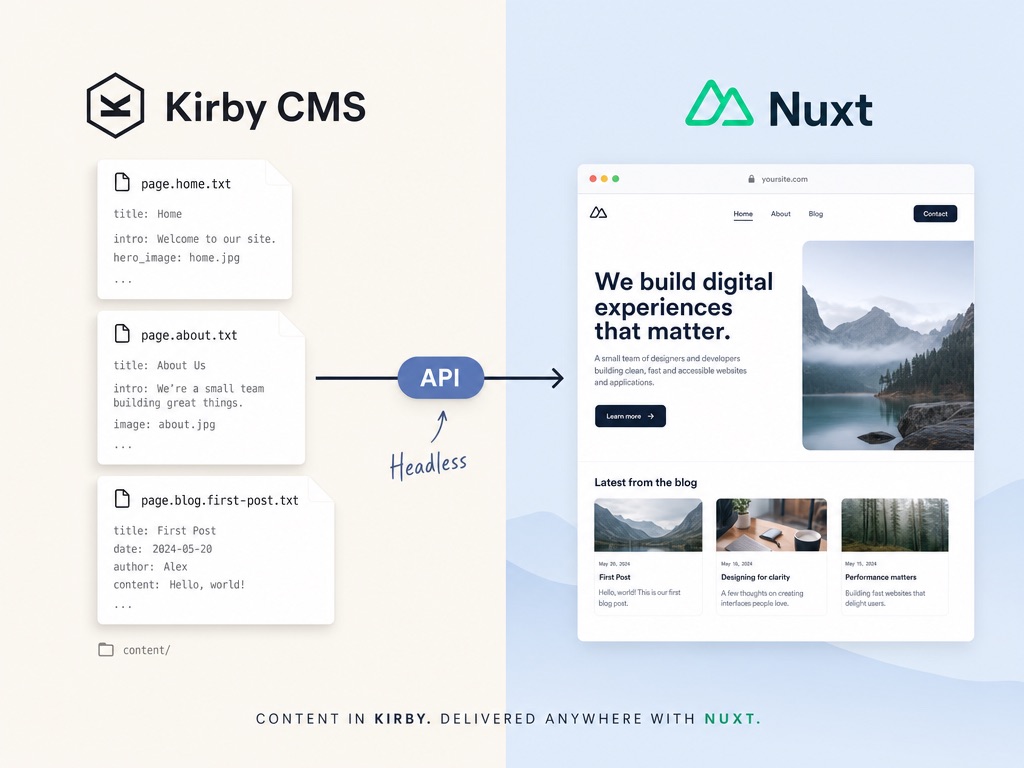
Every client project starts with the same two decisions: Kirby CMS in the backend, Nuxt as the frontend. This combination has proven itself over several years and many projects, not because it sounds good on paper, but because it works in practice. Websites that load fast, that clients can manage on their own, and that can be extended without a full rebuild when the business grows.
Why Nuxt and Not React
Anyone choosing a frontend framework today quickly lands on React. The community is large, the job postings are too. I still use Nuxt, a Vue-based framework, and have for years.
The difference is not about capability but about structure. React is deliberately minimal, with few conventions for how a project should be organised. For large teams with their own standards, that works fine. For someone who delivers client projects quickly and reliably, it is different: two React projects can be structured entirely differently, even if they aim for the same result.
Nuxt works differently. Pages live in pages/, components in components/, server logic in server/. This structure is not a restriction, it is a decision that pays off every day. Existing projects can be picked up again quickly after months away. New projects start from a familiar foundation.
On top of that, there is years of experience with the framework. I know the quirks of server-side rendering, how to use composables well, and where to be careful when a project grows. That knowledge does not transfer to another framework just because a new release comes out.
Why Kirby CMS as the Headless Backend
Kirby is a CMS from Munich with an unusual architectural decision: content is not stored in a database but saved as plain text files directly on the server. Each page corresponds to a folder, and every content field is a readable entry inside it.
Headless in this context means: Kirby manages the content but builds no frontend of its own. Nuxt fetches the data via an API and assembles it into the visible result. Content and presentation are kept strictly separated.
This has concrete consequences in day-to-day project work.
Backups require no special plugin and no database export. Copying the project folder is enough. Version control can be set up with Git, which means content changes can be rolled back the same way code changes are. No CMS export, no diff problem.
Security is another consideration. Kirby has no database, which eliminates one of the most common attack surfaces in traditional systems. SQL injection, the insertion of malicious code through database queries, is simply not possible in Kirby. No plugin chaos, no unmaintained dependencies becoming a vulnerability.
Performance is a natural result of the architecture. Because Nuxt builds the frontend and Kirby only delivers data, the output is statically generated or server-rendered pages with solid Core Web Vitals scores, without a complex caching setup.
How Kirby compares to WordPress in detail is covered in the post Kirby CMS vs. WordPress.
The Cacao Kit: A Structured Starting Point for Every Project
For both sides of the stack, I use starter kits from Johann Schopplich: the Cacao Kit Frontend for Nuxt and the Cacao Kit Backend for Kirby. Both kits are designed to work together and together form a complete, ready-to-use foundation.
The frontend kit includes the Nuxt configuration, KQL integration (Kirby's query language, which is used to fetch content from the backend in a structured way), SEO defaults, and sensible performance settings. You do not start from scratch but from a stable, tested base.
The backend kit delivers a matching Kirby instance with example blueprints, a preconfigured API endpoint, and the CORS configuration needed for a headless setup. Both kits work together from the start, which is not an accident but the intention behind them.
What this means in practice: a new project takes less than two days to reach a working version with real content from the CMS. The energy goes into what actually sets the project apart: structure, content, design.
Blueprints: The CMS Built to Specification
A central concept in Kirby is blueprints. These are configuration files that define which fields and content types exist in the backend panel. A blueprint for a project page looks different from one for a blog post, a landing page, or a category overview.
The effect is immediately noticeable: the CMS a client sees is exactly the CMS built for their project. No unused fields, no options that create confusion because they were meant for a different project. An architecture firm sees different input masks than a financial services provider.
The first conversation about content is also the first conversation about blueprint structure. What page types are there? Which fields does each page need? Which content does the client maintain themselves, and which is set once and left alone? These questions lead directly to the panel configuration, and the panel configuration leads directly to the frontend data structure. Both grow from the same requirements.
Kirby, AI, and Text Files: An Unexpected Advantage
Kirby's decision to store content as text files was originally made for simplicity and maintainability. As a side effect, it now offers a concrete advantage when working with AI tools.
Language models like Claude or ChatGPT work well with text files. Kirby content can be read, edited, and structured directly. To create content for a Kirby project, you can pass the blueprint structure to the model, meaning which fields exist and in what format, and get back ready-made Kirby files that can be dropped straight into the project.
No database connection, no import scripts, no manual detours. For structured content such as category pages, product descriptions, or multilingual text, this is a real time advantage.
It is not a substitute for thoughtful content. Quality matters regardless of who writes it. But for the portion of work where structure and volume matter more than originality, this workflow fits well. And because the content model is clearly defined in blueprints, the model can reliably write in the right structure without guessing.
How a Project Takes Shape in Practice
After the briefing, the work starts with structure: what page types are there, which fields does each page need, what should the client be able to change later? This content model defines the blueprints in Kirby and at the same time determines how the Nuxt frontend processes the data.
The Cacao Kit comes in as the base, is shaped to fit the project, and extended with project-specific components. The panel is built in parallel so that the client can manage content independently after handoff, without developer knowledge.
The result is a website where code and content are cleanly separated, maintenance is straightforward, and the technical foundation is stable enough to grow with the project without needing a full rebuild at the next extension. That sounds like a basic requirement, but in practice it is more often the exception than expected.
Drop me a short message about what you have in mind. A brief exchange is usually enough to see whether this workflow is the right fit.
mail@eugen.workThis article was drafted and translated with the assistance of AI.